
Classic virtualization solutions usually separate the hypervisor from the storage layer. Monitoring the storage in such configurations is generally not a major challenge, since most storage solutions already include integrated monitoring tools or support easy integration of third-party monitoring software.
The same applies to fully commercial hyper-converged solutions: storage monitoring is already handled by the vendor’s ecosystem and management stack.
The popular open-source virtualization platform Proxmox is free of charge, supports KVM- and container-based virtualization, and manages VMs, containers, storage, and virtual networks through an intuitive web GUI. However, the web interface does not include monitoring for integrated storage, and since a Proxmox node itself does not provide a graphical user interface, installing a dedicated storage manager is not straightforward.
CLI-based tools provide an effective solution here, as they can easily be integrated into comprehensive and convenient scripts. Due to the widespread adoption of Broadcom RAID controllers (formerly LSI), this article focuses on the CLI utility storcli. Broadcom provides storcli as an exceptionally powerful tool that replicates nearly all functions of the Broadcom Storage Manager on the command-line level.
Installing and Using StorCLI on Proxmox VE
Preparation
For the following steps, it is recommended to use a workstation with an SSH connection to the Proxmox node. Individual commands — including the complete script provided later in this guide — can then easily be copied directly into the terminal session.
Download the ZIP File
First, open the Broadcom website on your workstation and search for the RAID controller installed in your node. Since storcli is identical across all supported controllers, another controller download page can also be used if necessary. Under the “Downloads” tab in the “Management and Software Tools” section, you will find a link to the latest storcli version.
For simplicity, download the ZIP archive directly to your workstation first. Broadcom requires acceptance of a license agreement before download, which means the file cannot be downloaded directly via wget. Once the download has started, the actual download link becomes visible in the browser history and can then be used inside the SSH terminal with wget:
wget
Installation
First, install unzip:
apt-get update

apt-get install unzip
Next, extract the archive:
unzip versionnumber_StorCli.zip
Since Proxmox is Debian-based, there is no dedicated Debian package included in the archive. However, an Ubuntu subdirectory contains a compatible DEB package that can be used. After switching into that directory, install the package with:
dpkg -i storcli_versionnumber_all.deb
Usage
storcli is now ready to use. The binary path is:
/opt/MegaRAID/storcli/storcli64
You can verify functionality with a standard command:
/opt/MegaRAID/storcli/storcli64 show ctrlcount
This command outputs the number of Broadcom RAID controllers detected in the node.
StorCLI Scripts Available for Free Use
Initialization Script for CacheVault Configurations
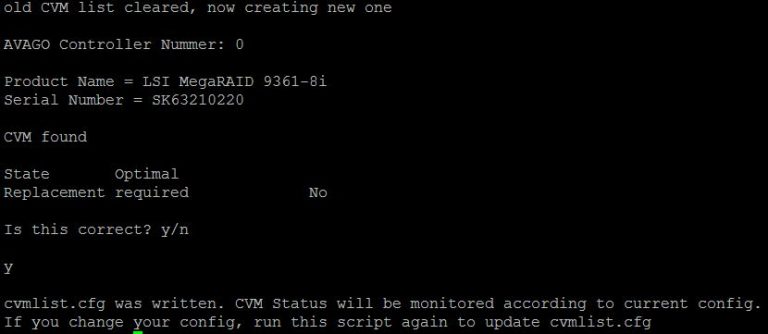
The actual monitoring script also checks for the presence and proper functionality of CacheVault modules. Since some configurations do not include CacheVault, the correct configuration must be defined before running the monitoring script for the first time. This initialization script should therefore be executed once in the monitoring script’s working directory. It generates a configuration file reflecting the CacheVault setup available at the time of execution.
If the system configuration changes later and the CacheVault setup is modified, the initialization script must be executed again to generate an updated configuration file.
You can conveniently download the initialization script using wget:
wget https://www.happyware.com/blog/wp-content/uploads/scripts/storcli/cachevault-initialisierung.sh
Monitoring Script
This script should be executed automatically via cron job at scheduled intervals.
Please note: Querying the controller interrupts the controller during normal operation. Running the script too frequently may reduce performance and potentially cause unwanted behavior. The recommended execution interval is at least every 30 minutes. In production environments, this interval is generally sufficient to remain within acceptable response times. Shorter intervals may of course be used for testing purposes.
The monitoring script can also be downloaded conveniently via wget:
wget https://www.happyware.com/blog/wp-content/uploads/scripts/storcli/storcli-monitoring.sh
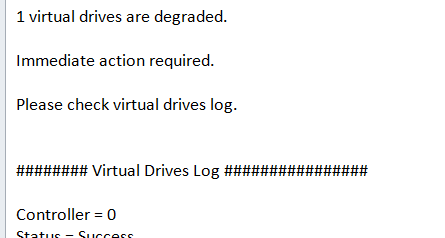
An example error message generated by the script is shown below and allows administrators to react quickly to potential issues.
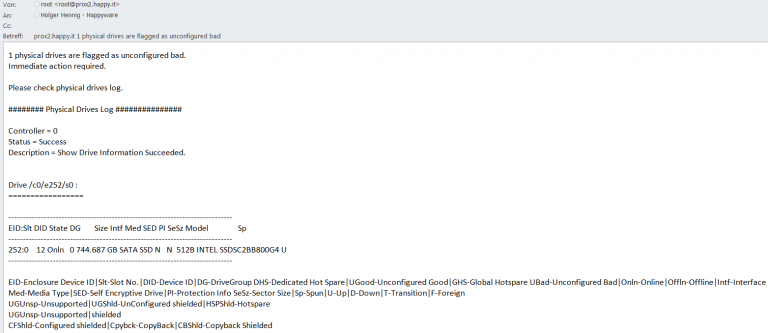
An error notification from the monitoring script. Detailed information is read directly from StorCLI and enables rapid troubleshooting.
Recent Blogs

New HPC / AI servers based on the AMD Instinct MI300 series
Posted onWith the MI300X Series, a new player has appeared on the GPU market that will reshuffle the cards in the AI sector. AMD Instinct™ MI300X…

We have moved – With our own new building, we are ready for the future
Posted onAfter nine months of construction, we were able to move into our new company building at the beginning of July. Our customers can now find…

Datacenter SSDs für den absoluten Performance-Boost
Posted onNoch keine Enterprise SSDs im Datacenter im Einsatz? Worauf warten Sie noch? Im Consumer Bereich haben SSDs längst Einzug gehalten. Und wer heute die Ladezeiten…